How to Embed a YouTube Video: Responsive, Autoplay, Loop and Privacy
By Technophile ·
Quick answer: this is a responsive, privacy-friendly YouTube embed. Replace VIDEO_ID with your video's ID:
<iframe
  style="width: 100%; aspect-ratio: 16 / 9; border: 0;"
  src="https://www.youtube-nocookie.com/embed/VIDEO_ID?playsinline=1"
  title="Your video title"
  allow="accelerometer; autoplay; clipboard-write; encrypted-media; gyroscope; picture-in-picture; web-share"
  referrerpolicy="strict-origin-when-cross-origin"
  loading="lazy"
  allowfullscreen
></iframe>
Or set every option visually with the Embed Code Generator and copy the HTML or React code.
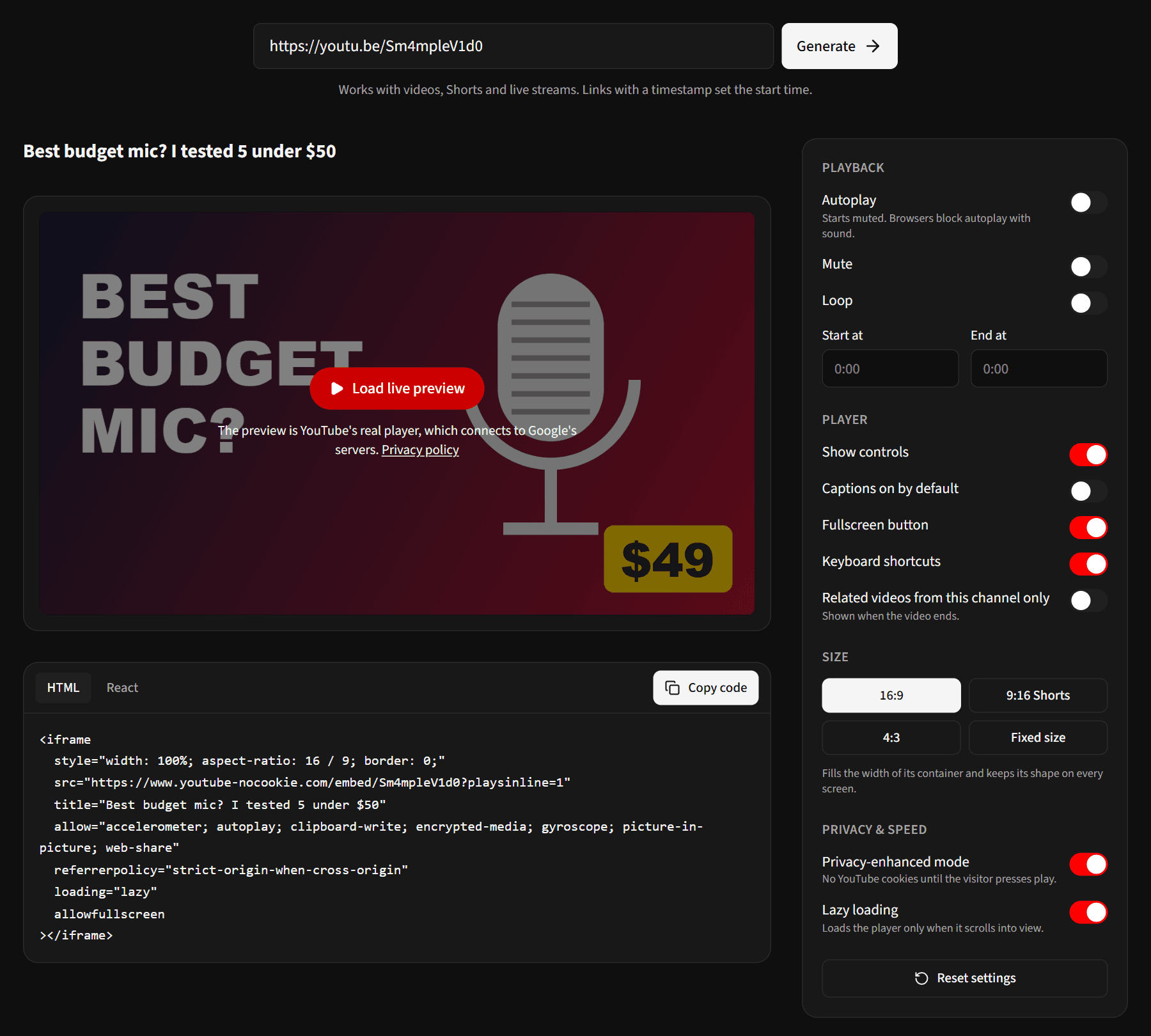
How do I make a YouTube embed responsive?
YouTube's own share code uses a fixed width="560" height="315", which overflows on phones. Instead, give the iframe width: 100% and aspect-ratio: 16 / 9. It then fills its container and keeps its shape on every screen. No wrapper div or padding trick is needed. Every current browser supports aspect-ratio.
For a Short, use aspect-ratio: 9 / 16 and limit the width (for example max-width: 360px) so it doesn't fill a whole desktop screen.
Why won't my YouTube embed autoplay?
Browsers block videos that start with sound on their own. Add mute=1 alongside autoplay=1:
https://www.youtube-nocookie.com/embed/VIDEO_ID?autoplay=1&mute=1
Viewers can unmute it themselves. Even muted, some browsers and data-saver modes still block autoplay, so never rely on it for anything important.
Why won't my YouTube embed loop?
loop=1 on its own does nothing for a single video. YouTube only loops playlists, so you have to make the video a playlist of one by repeating its ID:
https://www.youtube-nocookie.com/embed/VIDEO_ID?loop=1&playlist=VIDEO_ID
The generator adds this for you when you switch Loop on.
Useful embed parameters
| Parameter | What it does |
|---|---|
start=90 | Starts at 90 seconds (whole seconds only) |
end=150 | Stops at 150 seconds |
controls=0 | Hides the player controls |
cc_load_policy=1 | Turns captions on by default |
rel=0 | Shows related videos from your channel only when the video ends |
fs=0 | Removes the fullscreen button |
disablekb=1 | Turns off keyboard shortcuts |
playsinline=1 | Plays inside the page on iPhone instead of jumping to fullscreen |
rel=0 used to hide related videos completely. Since 2018 it only limits them to your own channel, and there's no setting to remove them entirely.
Paste a link with a timestamp (like youtu.be/VIDEO_ID?t=90) into the generator and it sets the start time for you.
What is privacy-enhanced mode?
Embeds from youtube-nocookie.com don't set YouTube cookies on your visitors until they press play. If your site serves visitors in the EU or UK, this helps with cookie-consent rules, since merely loading your page no longer drops tracking cookies. The video plays the same way. The generator uses privacy-enhanced mode by default.
Add loading="lazy" too. Browsers then skip loading the player until it's about to scroll into view, which makes pages with embeds load noticeably faster.
Frequently asked questions
Can I embed any YouTube video?
Only videos whose owners allow embedding. If an embed shows "Video unavailable", the owner has turned embedding off, or the video is private or blocked in the viewer's country.
How do I embed a YouTube video in React or Next.js?
Use the same iframe with React's attribute names (allowFullScreen, referrerPolicy, and a style object). The generator's React tab gives you ready-made JSX.
Do embedded views count as YouTube views?
Yes. Plays in an embedded player count toward the video's views like plays on YouTube itself.